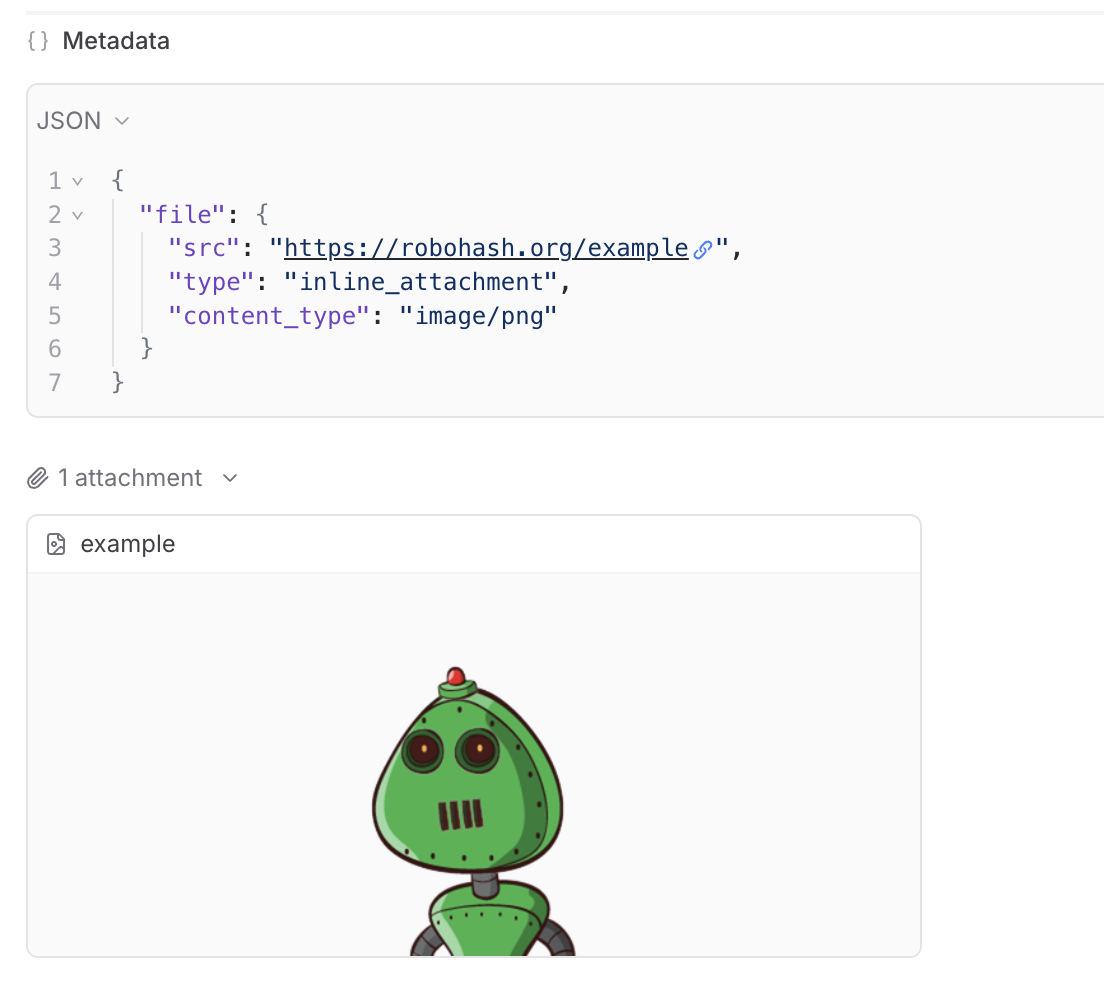
 ## View attachments in the UI
You can preview images, audio files, videos, PDFs, and JSON files in the Braintrust UI. You can also download any file to view it locally.
We provide built-in support to preview attachments directly in playground input cells and traces.
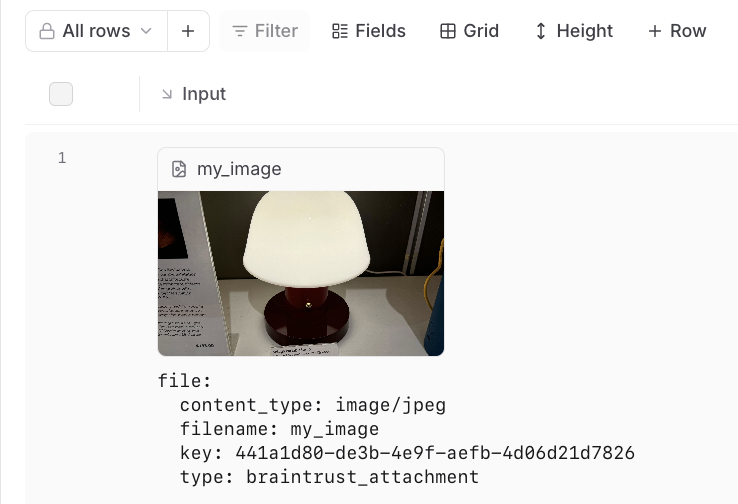
In the playground, you can preview attachments in an inline embedded view for easy visual verification during experimentation:
## View attachments in the UI
You can preview images, audio files, videos, PDFs, and JSON files in the Braintrust UI. You can also download any file to view it locally.
We provide built-in support to preview attachments directly in playground input cells and traces.
In the playground, you can preview attachments in an inline embedded view for easy visual verification during experimentation:
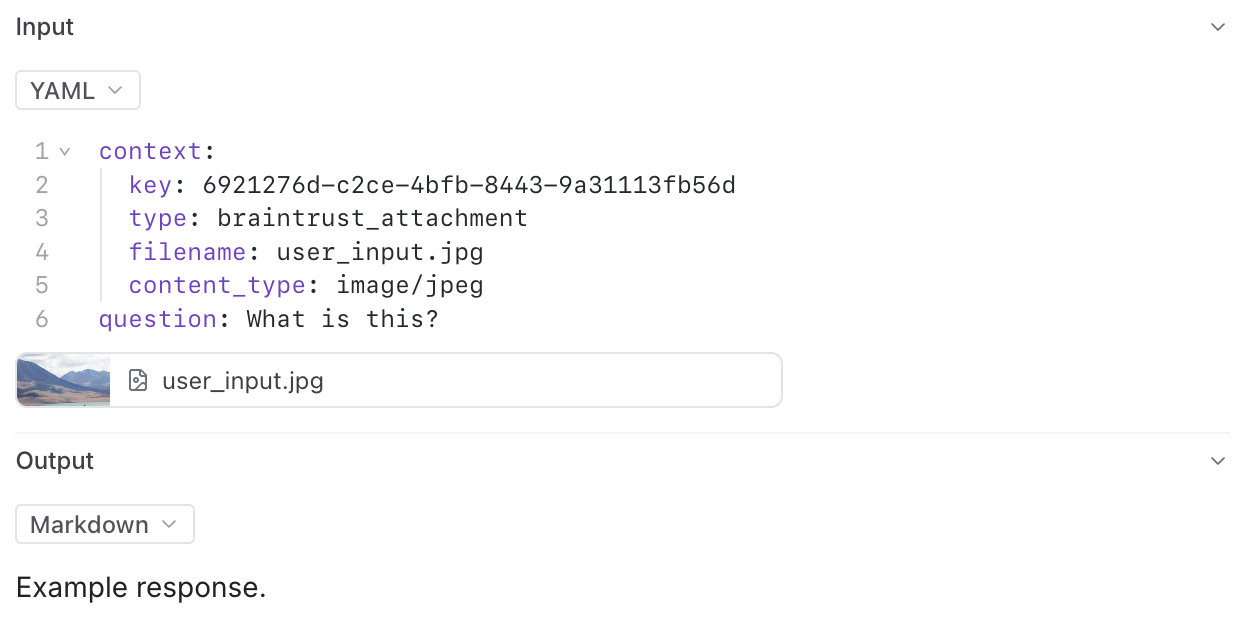
 In the trace pane, attachments appear as an additional list under the data viewer:
 ## Read attachments via SDK
You can programmatically read and process attachments using the Braintrust SDK. This allows you to access attachment data in your code for analysis, processing, or integration with other systems.
When accessing a dataset or experiment, the TypeScript and Python SDKs automatically create a `ReadonlyAttachment` object for each attachment.
For attachments in scorers or logs, use the `ReadonlyAttachment` class to access attachment data, check metadata, and process different content types.
### Access attachments from a dataset
## Read attachments via SDK
You can programmatically read and process attachments using the Braintrust SDK. This allows you to access attachment data in your code for analysis, processing, or integration with other systems.
When accessing a dataset or experiment, the TypeScript and Python SDKs automatically create a `ReadonlyAttachment` object for each attachment.
For attachments in scorers or logs, use the `ReadonlyAttachment` class to access attachment data, check metadata, and process different content types.
### Access attachments from a dataset
 Any headers you add to the configuration will be passed through in the request to the custom endpoint.
The values of the headers can also be templated using Mustache syntax.
Currently, the supported template variables are `{{email}}` and `{{model}}`.
which will be replaced with the email of the user whom the Braintrust API key belongs to and the model name, respectively.
If the endpoint is non-streaming, set the `Endpoint supports streaming` flag to false. The proxy will
convert the response to streaming format, allowing the models to work in the playground.
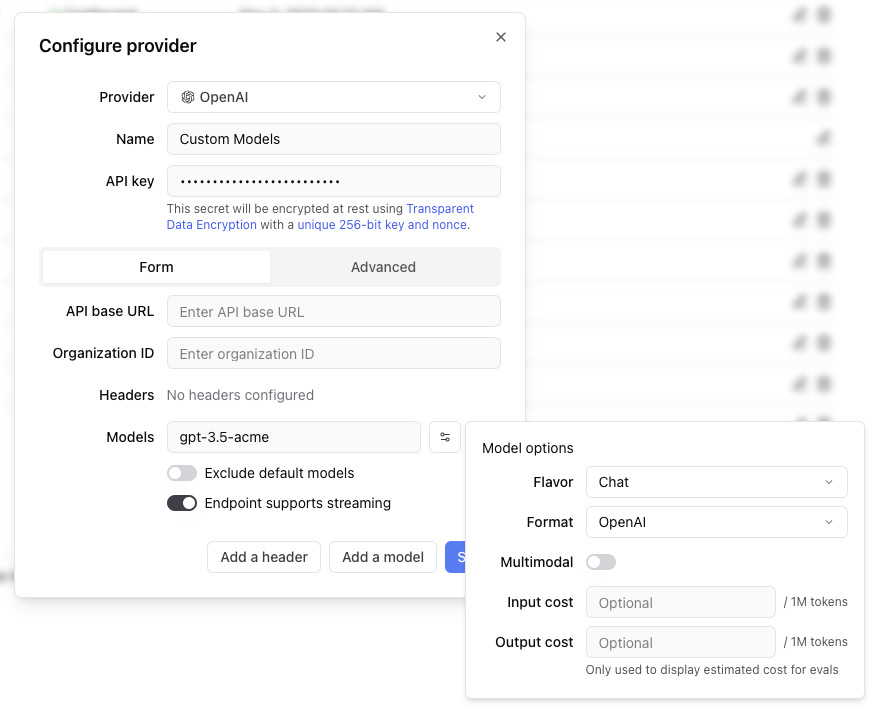
Each custom model must have a flavor (`chat` or `completion`) and format (`openai`, `anthropic`, `google`, `window` or `js`). Additionally, they can
optionally have a boolean flag if the model is multimodal and an input cost and output cost, which will only be used to calculate and display estimated
prices for experiment runs.
#### Specify an org
If you are part of multiple organizations, specify which organization to use by passing the `x-bt-org-name`
header in the SDK:
Any headers you add to the configuration will be passed through in the request to the custom endpoint.
The values of the headers can also be templated using Mustache syntax.
Currently, the supported template variables are `{{email}}` and `{{model}}`.
which will be replaced with the email of the user whom the Braintrust API key belongs to and the model name, respectively.
If the endpoint is non-streaming, set the `Endpoint supports streaming` flag to false. The proxy will
convert the response to streaming format, allowing the models to work in the playground.
Each custom model must have a flavor (`chat` or `completion`) and format (`openai`, `anthropic`, `google`, `window` or `js`). Additionally, they can
optionally have a boolean flag if the model is multimodal and an input cost and output cost, which will only be used to calculate and display estimated
prices for experiment runs.
#### Specify an org
If you are part of multiple organizations, specify which organization to use by passing the `x-bt-org-name`
header in the SDK:

### Big number
Shows a single value over the timeframe as one big number.

### Presets
These are the default charts that are included on the **Monitor** page.

## Select a timeframe
Select a timeframe from the given options to see the data associated with that time period. For time series charts you can also click and drag horizontally to select a fixed timeframe to zoom in on. And double click a chart to zoom out.

## View traces
To see specific traces, select a data point on any chart. It will redirect you to the logs or experiments page filtered to the corresponding time range and series.
## Create custom dashboards
The default view (dashboard) shows all data for a project. To create a custom dashboard, add or edit any chart. You will be prompted to create a new view before you save. You can also use the drop down in the top left to duplicate the current view and save as a new dashboard.
---
file: ./content/docs/platform/organizations.mdx
meta: {
"title": "Organizations",
"description": "Organizations overview and settings"
}
# Organizations
Organizations in Braintrust represent a collection of projects and users. Most commonly, an organization is a business or team. You can create multiple organizations to organize your projects and collaborators in different ways, and a user can be a member of multiple organizations.
Each organization has settings than can be customized by navigating to **Settings** > **Organization**. You can also customize organization settings using the [API](./api/Organizations).
## Members
In the **Members** section, you can see all members of your organization and manage their roles and permissions. You can also invite new members by selecting **Invite member** and inputting their email address(es). Each member must be assigned a permission group.
## Permission groups
Permission groups are the core of Braintrust's access control system, and are collections of users that can be granted specific permissions. In the **Permission groups** section, you can find existing and create new permission groups. For more information about permission groups, see the [access control guide](/docs/guides/access-control).
## API keys
In the **API keys** section, you can create and manage your Braintrust API keys. If you're an organization owner, you can also manage API keys for everyone in your organization. API keys are scoped to the organization and inherit permissions from the person who created them.
## Service tokens
In the **Service tokens** section, you can create and manage service accounts and service tokens suitable for system integrations. Service accounts are not tied to users and can be assigned granular permissions.
## AI providers
Braintrust supports most AI providers through the [AI proxy](/docs/guides/proxy), which allows you to use any of the [supported models](/docs/guides/proxy#supported-models). In the **AI providers** section, you can configure API keys for the AI providers on behalf of your organization, or add custom providers.
### Custom AI providers
You can also add custom AI providers. Braintrust supports custom models and endpoint configuration for all providers.
## Environment variables
Environment variables are secrets that are scoped to all functions (prompts, scorers, and tools) in a specific organization. You can set environment variables in the **Env variables** section by saving the key-value pairs.
## API URL
If you are self-hosting Braintrust, you can set the API URL, proxy URL, and real-time URL in your organization settings. You can also find the test commands (with token) for test pinging the API, proxy, and realtime from the command line. For more information about self-hosting Braintrust, see the [self-hosting guide](/docs/guides/self-hosting).
## Git metadata
In the **Logging** section, you can select which git metadata fields to log, if any.
---
file: ./content/docs/platform/playground.mdx
meta: {
"title": "Playgrounds",
"description": "Explore, compare, and evaluate prompts"
}
# Eval playgrounds
Playgrounds are a powerful workspace for rapidly iterating on AI engineering primitives. Tune prompts, models, scorers and datasets in an editor-like interface, and run full evaluations in real-time, side by side.
Use playgrounds to build and test hypotheses and evaluation configurations in a flexible environment. Playgrounds leverage the same underlying `Eval` structure as experiments, with support for running thousands of dataset rows directly in the browser. Collaborating with teammates is also simple with a shared URL.
Playgrounds are designed for quick prototyping of ideas. When a playground is run, its previous generations are overwritten. You can create [experiments](/docs/platform/experiments) from playgrounds when you need to capture an immutable snapshot of your evaluations for long-term reference or point-in-time comparison.
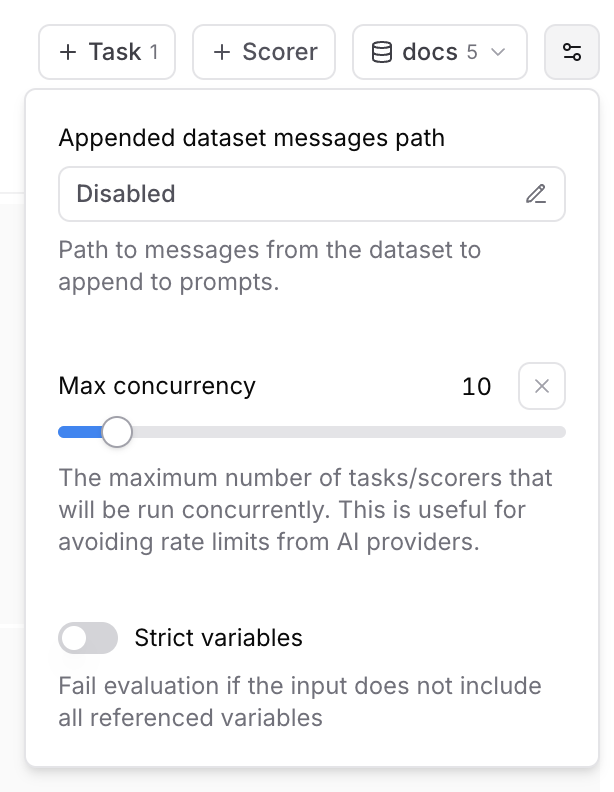 ### Max concurrency
The maximum number of tasks/scorers that will be run concurrently in the playground. This is useful for avoiding rate limits (429 - Too many requests) from AI providers.
### Strict variables
When this option is enabled, evaluations will fail if the dataset row does not include all of the variables referenced in prompts.
## Collaboration
Playgrounds are designed for collaboration and automatically synchronize in real-time.
To share a playground, copy the URL and send it to your collaborators. Your collaborators
must be members of your organization to view the playground. You can invite users from the settings page.
## Reasoning
### Max concurrency
The maximum number of tasks/scorers that will be run concurrently in the playground. This is useful for avoiding rate limits (429 - Too many requests) from AI providers.
### Strict variables
When this option is enabled, evaluations will fail if the dataset row does not include all of the variables referenced in prompts.
## Collaboration
Playgrounds are designed for collaboration and automatically synchronize in real-time.
To share a playground, copy the URL and send it to your collaborators. Your collaborators
must be members of your organization to view the playground. You can invite users from the settings page.
## Reasoning
URL String | Required. Your Azure OpenAI service endpoint URL in the format `https://{resource-name}.openai.azure.com`. [Documentation](https://docs.microsoft.com/en-us/azure/cognitive-services/openai/reference#rest-api-versioning) | | **Authentication type**
`api_key` \| `entra_api` | Optional. Choose between API key or Entra API authentication. Default is `api_key`. [Documentation](https://docs.microsoft.com/en-us/azure/cognitive-services/openai/reference#authentication) | | **API version**
String | Optional. The API version to use for requests. Default is `2023-07-01-preview`. [Documentation](https://docs.microsoft.com/en-us/azure/cognitive-services/openai/reference#rest-api-versioning) | | **Deployment**
String | Optional. The deployment name for your model (if using named deployments). [Documentation](https://docs.microsoft.com/en-us/azure/cognitive-services/openai/how-to/create-resource) | | **No named deployment**
Boolean | Optional. Whether to skip using deployment names in the request path. Default is `false`. If true, the deployment name will not be used in the request path. | ## Models Azure OpenAI provides access to OpenAI models including: * GPT-4o `gpt-4o` * GPT-4 `gpt-4` * GPT-3.5 Turbo `gpt-35-turbo` * DALL-E 3 `dall-e-3` * Whisper `whisper` **Note**: Model availability varies by region and requires deployment through the Azure portal. ## Setup requirements 1. **Azure OpenAI Resource**: Create an Azure OpenAI service resource in the Azure portal 2. **Model Deployment**: Deploy the models you want to use through the Azure portal 3. **API Access**: Obtain your API key or configure Entra ID authentication 4. **Regional Availability**: Ensure your chosen region supports the models you need ## Additional resources * [Azure OpenAI Documentation](https://docs.microsoft.com/en-us/azure/cognitive-services/openai/) * [Model Availability](https://docs.microsoft.com/en-us/azure/cognitive-services/openai/concepts/models) * [Azure OpenAI Pricing](https://azure.microsoft.com/en-us/pricing/details/cognitive-services/openai-service/) * [Quickstart Guide](https://docs.microsoft.com/en-us/azure/cognitive-services/openai/quickstart) --- file: ./content/docs/providers/baseten.mdx meta: { "title": "Baseten", "description": "Baseten model provider configuration and integration guide" } # Baseten Baseten provides scalable infrastructure for deploying and serving machine learning models, including language models and custom AI applications. Braintrust integrates seamlessly with Baseten through direct API access, wrapper functions for automatic tracing, and proxy support. ## Setup To use Baseten models, configure your Baseten API key in Braintrust. 1. Get a Baseten API key from [Baseten Console](https://app.baseten.co/settings/api-keys) 2. Add the Baseten API key to your organization's [AI providers](/app/settings/secrets) 3. Set the Baseten API key and your Braintrust API key as environment variables ```bash title=".env" BASETEN_API_KEY=
String | Required. The AWS region where your Bedrock models are hosted. [Documentation](https://docs.aws.amazon.com/AWSEC2/latest/UserGuide/using-regions-availability-zones.html) | | **Access key**
String | Required. Your AWS access key ID for authentication. [Documentation](https://docs.aws.amazon.com/IAM/latest/UserGuide/id_credentials_access-keys.html) | | **Secret**
String | Required. Your AWS secret access key (entered separately in the secret field). [Documentation](https://docs.aws.amazon.com/IAM/latest/UserGuide/id_credentials_access-keys.html) | | **Session token**
String | Optional. Temporary session token for AWS STS (Security Token Service) authentication. [Documentation](https://docs.aws.amazon.com/IAM/latest/UserGuide/id_credentials_temp_use-resources.html) | | **API base**
URL String | Optional. Custom API endpoint URL if using a different Bedrock endpoint. Default uses AWS Bedrock default endpoints. | ## Models Popular AWS Bedrock models include: * Claude 3.5 Sonnet `anthropic.claude-3-5-sonnet-20241022-v2:0` * Claude 3 Haiku `anthropic.claude-3-haiku-20240307-v1:0` * Llama 3.1 70B `meta.llama3-1-70b-instruct-v1:0` * Titan Text `amazon.titan-text-express-v1` ## Additional resources * [AWS Bedrock Documentation](https://docs.aws.amazon.com/bedrock/) * [Bedrock Model IDs](https://docs.aws.amazon.com/bedrock/latest/userguide/model-ids.html) * [Bedrock Pricing](https://aws.amazon.com/bedrock/pricing/) --- file: ./content/docs/providers/cerebras.mdx meta: { "title": "Cerebras", "description": "Cerebras model provider configuration and integration guide" } # Cerebras Cerebras provides ultra-fast inference for large language models using specialized hardware architecture. Braintrust integrates seamlessly with Cerebras through direct API access, wrapper functions for automatic tracing, and proxy support. ## Setup To use Cerebras models, configure your Cerebras API key in Braintrust: 1. Get a Cerebras API key from [Cerebras Cloud](https://cloud.cerebras.ai/) 2. Add the Cerebras API key to your organization's [AI providers](/app/settings/secrets) 3. Set the Cerebras API key and your Braintrust API key as environment variables ```bash title=".env" CEREBRAS_API_KEY=
### Configuration options
Specify the following for your custom provider.
* **Provider name**: A unique name for your custom provider
* **Model name**: The name of your custom model (e.g., `gpt-3.5-acme`, `my-custom-llama`)
* **Endpoint URL**: The API endpoint for your custom model
* **Format**: The API format (`openai`, `anthropic`, `google`, `window`, or `js`)
* **Flavor**: Whether it's a `chat` or `completion` model (default: `chat`)
* **Headers**: Any custom headers required for authentication or configuration
### Custom headers and templating
Any headers you add to the configuration are passed through in the request to the custom endpoint. The values of the headers can be templated using Mustache syntax with these supported variables:
* `{{email}}`: Email of the user associated with the Braintrust API key
* `{{model}}`: The model name being requested
Example header configuration:
```
Authorization: Bearer {{api_key}}
X-User-Email: {{email}}
X-Model: {{model}}
```
### Streaming support
If your endpoint doesn't support streaming natively, set the "Endpoint supports streaming" flag to false. Braintrust will automatically convert the response to streaming format, allowing your models to work in the playground and other streaming contexts.
### Model metadata
You can optionally specify:
* **Multimodal**: Whether the model supports multimodal inputs
* **Input cost**: Cost per million input tokens (for experiment cost estimation)
* **Output cost**: Cost per million output tokens (for experiment cost estimation)
URL String | Required. Your Databricks workspace URL in the format `https://{workspace-name}.cloud.databricks.com`. [Documentation](https://docs.databricks.com/dev-tools/api/latest/index.html#workspace-instance-names) | | **Authentication type**
`pat` \| `service_principal_oauth` | Optional. Choose between personal access token or service principal OAuth. Default is `pat`. [Documentation](https://docs.databricks.com/dev-tools/api/latest/authentication.html) | | **Secret**
String | Required if using `pat` auth type. Your Databricks personal access token. [Documentation](https://docs.databricks.com/dev-tools/api/latest/authentication.html#token-management) | | **Client ID**
String | Required if using `service_principal_oauth` auth type. Client ID for service principal authentication. [Documentation](https://docs.databricks.com/dev-tools/api/latest/oauth.html) | | **Client Secret**
String | Required if using `service_principal_oauth` auth type. Client secret for service principal authentication. [Documentation](https://docs.databricks.com/dev-tools/api/latest/oauth.html) | ## Models Databricks provides access to several foundation models through Model Serving. ### Foundation models * Meta Llama 3.1 70B Instruct * Meta Llama 3.1 8B Instruct * Mistral 7B Instruct * Mixtral 8x7B Instruct * MPT-7B Instruct ### Custom models Deploy your own fine-tuned models through Databricks Model Serving. ## Setup requirements 1. **Databricks Workspace**: Ensure you have access to a Databricks workspace 2. **Model Serving**: Enable Model Serving in your workspace 3. **Authentication**: Set up either PAT or service principal authentication 4. **Model Endpoints**: Deploy the models you want to use as serving endpoints ## Endpoint configuration Configure the following for model endpoints in Databricks. 1. **Serving Endpoint Name**: Use this as the model name in Braintrust 2. **Endpoint URL**: Automatically constructed from your workspace URL 3. **Authentication**: Uses the configured authentication method ## Additional resources * [Databricks Model Serving Documentation](https://docs.databricks.com/machine-learning/model-serving/index.html) * [Foundation Model APIs](https://docs.databricks.com/machine-learning/foundation-models/index.html) * [Authentication Guide](https://docs.databricks.com/dev-tools/api/latest/authentication.html) * [Model Serving Pricing](https://databricks.com/product/pricing/model-serving) --- file: ./content/docs/providers/fireworks.mdx meta: { "title": "Fireworks", "description": "Fireworks AI model provider configuration and integration guide" } # Fireworks Fireworks AI provides fast inference for open-source language models including Llama, Mixtral, Code Llama, and other state-of-the-art models. Braintrust integrates seamlessly with Fireworks through direct API access, wrapper functions for automatic tracing, and proxy support. ## Setup To use Fireworks models, configure your Fireworks API key in Braintrust. 1. Get a Fireworks API key from [Fireworks AI Console](https://fireworks.ai/account/api-keys) 2. Add the Fireworks API key to your organization's [AI providers](/app/settings/secrets) 3. Set the Fireworks API key and your Braintrust API key as environment variables ```bash title=".env" FIREWORKS_API_KEY=
String | Required. Your [Google Cloud Project ID](https://cloud.google.com/resource-manager/docs/creating-managing-projects) where Vertex AI is enabled. | | **Authentication type**
`access_token` \| `service_account_key` | Required. Choose between access token or service account key authentication. [Documentation](https://cloud.google.com/vertex-ai/docs/authentication) | | **Secret**
JSON String | Required if using `service_account_key` auth type. The service account key JSON content. [Documentation](https://cloud.google.com/iam/docs/creating-managing-service-account-keys) | | **API base**
URL String | Optional. Custom API endpoint URL if using a different Vertex AI endpoint. [Documentation](https://cloud.google.com/vertex-ai/docs/reference/rest#service-endpoint). Default is `https://{location}-aiplatform.googleapis.com`. | ## Models Popular Vertex AI models include: * Gemini 1.5 Pro (`gemini-1.5-pro`) * Gemini 1.5 Flash (`gemini-1.5-flash`) * PaLM 2 (`text-bison`) * Codey (`code-bison`) ## Setup requirements 1. **Enable Vertex AI API**: Ensure the Vertex AI API is enabled in your Google Cloud project 2. **Service account permissions**: If using service account authentication, ensure the service account has the `AI Platform Developer` role 3. **Quotas**: Check your project's Vertex AI quotas and limits ## Additional resources * [Vertex AI Documentation](https://cloud.google.com/vertex-ai/docs) * [Vertex AI Model Garden](https://cloud.google.com/vertex-ai/docs/model-garden/explore-models) * [Vertex AI Pricing](https://cloud.google.com/vertex-ai/pricing) * [Authentication Guide](https://cloud.google.com/vertex-ai/docs/authentication) --- file: ./content/docs/providers/groq.mdx meta: { "title": "Groq", "description": "Groq model provider configuration and integration guide" } # Groq Groq provides ultra-fast inference for open-source language models including Llama, Mixtral, and Gemma models. Braintrust integrates seamlessly with Groq through direct API access, wrapper functions for automatic tracing, and proxy support. ## Setup To use Groq models, configure your Groq API key in Braintrust. 1. Get a Groq API key from [Groq Console](https://console.groq.com/keys) 2. Add the Groq API key to your organization's [AI providers](/app/settings/secrets) 3. Set the Groq API key and your Braintrust API key as environment variables ```bash title=".env" GROQ_API_KEY=
### Iterative experimentation
Rapidly prototype with different prompts
and models in the [playground](/docs/guides/playground)
and models in the [playground](/docs/guides/playground)
### Performance insights
Built-in tools to [evaluate](/docs/guides/evals) how models and prompts are performing in production, and dig into specific examples
### Real-time monitoring
[Log](/docs/guides/logging), monitor, and take action on real-world interactions with robust and flexible monitoring
### Data management
[Manage](/docs/guides/datasets) and [review](/docs/guides/human-review) data to store and version
your test sets centrally
your test sets centrally
We plan to support export to Google Cloud Storage and Azure Blob Storage in the future. If you'd like to see this feature, please [get in touch](mailto:support@braintrust.dev).
#### US East 2 {`https://braintrust-cf-us-east-2.s3.amazonaws.com/braintrust-latest.yaml`}
#### US West 2 {`https://braintrust-cf-us-west-2.s3.amazonaws.com/braintrust-latest.yaml`}
To start in us-east-1, [click here to open up the CloudFormation setup window](https://console.aws.amazon.com/cloudformation/home#/stacks/create/review?templateURL=https://braintrust-cf-us-east-1.s3.amazonaws.com/braintrust-latest.yaml). If you prefer, you can also click “Create Stack” directly in the CloudFormation console and specify one of the URLs above as the S3 template link. 
You can also opt into sending telemetry to our Datadog instance, and we can monitor the uptime of your system for you. | When you run into issues (e.g. Internal server errors), you’ll have to find them in your logs, and either share the log messages with us (or try to diagnose them yourself). You will also need to configure your own monitoring/alerting. We can provide guidance on what to look for to know something is wrong.
We are currently working on a new revision to how we monitor all clusters (see below). | ## Monitoring We have learned some important lessons from customers at varying scale: * There are a handful of Braintrust-specific metrics (like Brainstore indexing lag) that tell us whether the system is struggling. * Generally, when customers find issues, they immediately notify us and we work together on gathering context from their logs. The time between identifying an issue and getting us the relevant bits of information is usually a major contributor to downtime. * Many issues, if identified proactively or quickly, can be resolved with little or no downtime. Ideally we can issue alerts as soon as we detect them. To address these in the most efficient way possible, self-hosted Braintrust (Terraform and Docker) now automatically sends a subset of telemetry back to our control plane. By default, we send metrics and status information but not logs or traces. Each service supports the following: * Sending metrics, logs, and traces to Braintrust's control plane. These requests are automatically authorized using your license key and therefore tied to your account. We will use this information to monitor the health of your deployment for you. * While we are careful not to include any PII in logs or traces, we understand that you may not feel comfortable sending them to us. Each type of telemetry (metrics, logs, and traces) can be individually enabled or disabled. * Metrics and traces can be sent to an OpenTelemetry destination of your choice (via HTTP). You can collect logs directly from the Lambda functions and Docker containers. We can provide high level guidance on what to look for, but we're not planning to build integrations into specific observability tools for you to monitor the system. * There are a few endpoints that Braintrust's engineering team can access to debug issues and monitor system health. Specifically, the `/brainstore/backfill/*` endpoints which report system metrics about the backfill and compaction status of Brainstore segments. Note that these endpoints do not access or expose any data, just metadata from Brainstore. You can disable these endpoints by setting the `DISABLE_SYSADMIN_TELEMETRY` environment variable to `true`. * There is an optional, `TELEMETRY_ENABLED` flag which sends billing and usage data to Braintrust. This is disabled by default, but it may be required depending on your contract with Braintrust. It may default to enabled in the future. In general, our approach will be to send ourselves enough information to (a) proactively notify ourselves and you when something is going wrong and (b) have the information required to diagnose issues without asking you to dig it up for us. We also plan to explore visualizing system health in an admin dashboard directly in our UI. ## Upgrades We release new versions of the data plane around once per week, often with incremental changes that improve the performance of Brainstore, add support for new UI features, and improve logging. You do not need to update this often, but here is a framework for how often you should update: * Generally speaking, customers update about once per month * You must update at least once per quarter * If you require support, either to diagnose an issue or improve a certain feature, we will likely ask you to upgrade to the latest version as a first step. We do not have specific long-term releases at this point, and our team is therefore best equipped to support the latest version. While upgrading, if you use our built-in Terraform modules, run `terraform apply`. This will make any relevant infra changes, as well as update the versions of Braintrust’s code. If you are deploying via Docker, then you should: * Make sure to update both the API and Brainstore services to the same version. Running mismatched versions can result in downtime. * Periodically review the Terraform template and docs to make sure you are following best practices and have all of the necessary infrastructure components in place. ## Remote access There are occasionally issues that will require ad-hoc debugging or running manual commands against the container, Postgres database, or storage buckets to repair the state of the system. Customers who give us remote access (as needed) have experienced much faster resolutions when such issues occur, because our team can connect directly and resolve things. We understand that this is not always possible, but if not, we kindly ask you to factor this into your uptime calculations. Said another way, if uptime of Braintrust is a key metric for you, then you should strongly consider making remote access, as needed, available to our team. If you cannot set up remote access, then make sure that you can swiftly spin up a terminal that can perform the following: * Access the containers directly (`docker exec`, update them, view logs, restart them, view host metrics like CPU, network, memory, and disk utilization) * Run SQL queries against Postgres * Connect to Redis * Run read, write, and list commands against your storage buckets It’s important that your on-call staff have basic familiarity with Braintrust and the ability to perform all of these operations. *** 1 CloudFormation was our original infrastructure option and is not recommended for new deployments, but will continue to be supported for existing users. All of the trade-offs and considerations that apply to Terraform apply to CloudFormation as well. --- file: ./content/docs/guides/traces/customize.mdx meta: { "title": "Customize traces" } # Customize traces You can customize how you trace to better understand how your application runs and make it easier to find and fix problems. By adjusting how you collect and manage trace data, you can better track complex processes, monitor systems that work across multiple services, and debug issues more effectively. ## Annotating your code You can add traces for multiple, specific functions in your code to your logs by annotating them with functional wrappers (TypeScript) or decorators and context managers (Python):
Image, audio, video, and PDF attachments can be previewed in Braintrust. All
attachments can be downloaded for viewing locally.
### Using external files as attachments
Braintrust also supports references to files in external object stores with
the `ExternalAttachment` object. You can use this anywhere you would use an
`Attachment`. See the [Attachments](/docs/guides/attachments) guide for more
information.
### Uploading large traces
Braintrust has a 6MB limit on individual logging upload requests. However, you may need to log larger data structures, such as lengthy conversation
transcripts, extensive document sets, or complex nested objects. The `JSONAttachment` allows you to upload JSON data inline, and it will automatically
get converted to an [Attachment](/docs/guides/attachments) behind the scenes.
When you use `JSONAttachment`, your JSON data is:
* Uploaded separately as an attachment, bypassing the 6MB trace limit
* Not indexed, which saves storage space and speeds up ingestion, but not available for search or filtering
* Still fully viewable in the UI with all the features of the JSON viewer (collapsible nodes, syntax highlighting, etc.)
This approach is ideal for data that you want to preserve for debugging but don't need to search across traces.
## Errors
When you run:
* Python code inside of the `@traced` decorator or within a `start_span()` context
* TypeScript code inside of `traced` (or a `wrappedTraced` function)
Braintrust will automatically log any exceptions that occur within the span.

Under the hood, every span has an `error` field which you can also log to directly.
No data
;
}
return (
Reset Password
```
Reset Password
```

John Doe
Lorem ipsum dolor sit amet, consectetur adipiscing elit. Nulla ut turpis
hendrerit, ullamcorper velit in, iaculis arcu.
500
Followers
250
Following
1000
Posts
```